-theme gotham-font modal-open" data-performance-relative-value="0.005" data-internal-page-name="Login" data-send-event-percentage="0" style="overflow: hidden; padding-right: 17px;">
-theme gotham-font " data-number-of-autocomplete-suggestions="7" data-is-redirect-library-to-creator-marketplace-enabled="True">
Starting Roblox...
Connecting to People...
Check Always open links for URL: Roblox Protocol and click Open URL: Roblox Protocol in the dialog box above to join experiences faster in the future!
-
1
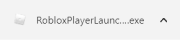
Click RobloxPlayer.exe to run the Roblox installer, which just downloaded via your web browser.
-
2
Click Run when prompted by your computer to begin the installation process.

-
3
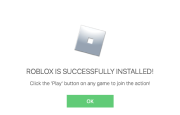
Click Ok once you've successfully installed Roblox.
-
4
After installation, click Join below to join the action!
The Roblox installer should download shortly. If it doesn’t, start the
download now.